Tongue Driller
 Image credit: Ling App
Tongue Driller is a small desktop app by Ville Langén for language drills. Prompt on top, type the answer, Enter to check. Optional translation, grammar note, and spoken answer (TTS). UI in Finnish or English.
You can use it (download first):
- macOS Apple Silicon: TongueDriller-arm64.dmg
- macOS Intel: TongueDriller-intel.dmg
- Windows: TongueDriller.exe
All builds and notes: GitHub Releases (v1.0.0).
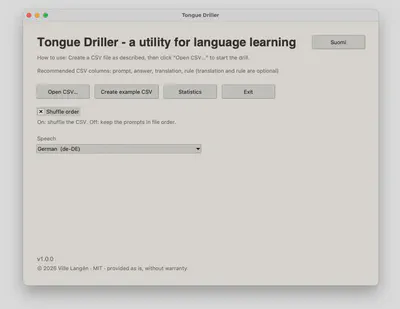
Opening screen
Open a CSV chapter, create the built-in English–German example, toggle shuffle, and pick a speech voice. Switch the UI with Suomi / English.
How it works
- Open a CSV chapter (or create the example).
- Read the prompt, type the answer, press Enter.
- See correct / incorrect; optionally show translation, rule, and hear TTS.
Examples of how to use the app
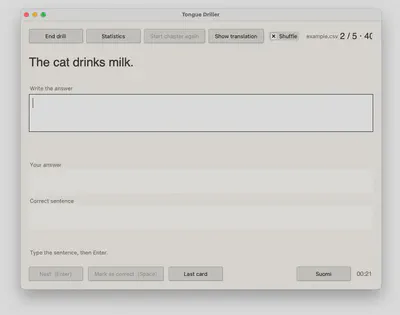
A simple translation: English prompt on top, type the German (or other) sentence below, then Enter.
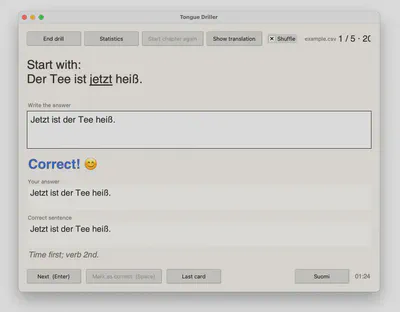
A word-order drill: prompt on top, your answer below, then instant feedback plus a short grammar tip.
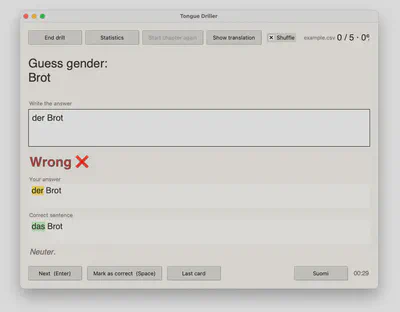
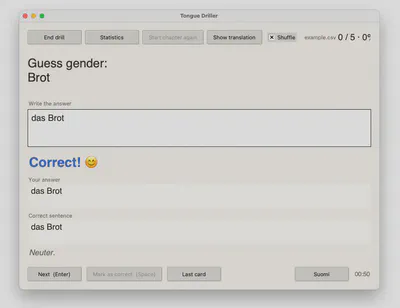
Gender drills work the same way—wrong answers highlight the mismatch; correct ones confirm the article.
Statistics
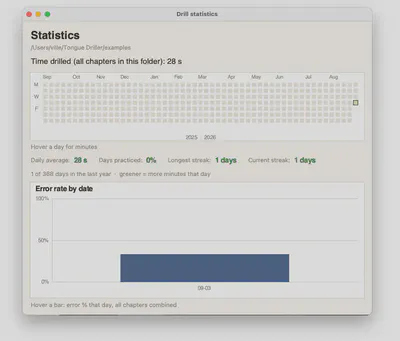
Per-folder totals: a year heatmap of minutes drilled, streaks, and an error-rate chart by day.
CSV format
Recommended columns: prompt, answer, translation, rule (last two optional). Headers optional—column 1 is the prompt, column 2 the answer.
- Underscores around a word underline it in the prompt.
- In the file,
\nstarts a new line in the prompt.
Keep personal chapter files private; chapters/ is gitignored in the public repo.
Run from source
Needs Python 3 with Tkinter:
python3 drill.py
On Mac, Homebrew Python 3.14 often lacks Tkinter—use 3.13 if needed.
Development & Support
Open source (MIT) on GitHub. Issues and ideas welcome there.